
You tweak a skill, swap a model or add an MCP tool, and your agent behaves a little differently. Did it get better or worse? Copilot Evals, which GitHub put into public preview on November 17, 2026, is built to answer that with evidence instead of a hunch.
GitHub’s definition is short: an eval is “a repeatable test for AI behavior.” It’s the same principle behind the Claude Code team’s verification lessons: agent work only counts when something checks it. Here is what Copilot Evals does, how to set it up, and what to watch out for while it’s in preview.
Watch the 2-minute version
Key takeaways
- Copilot Evals tests three kinds of customization: skills, custom agents and MCP tools.
- It runs in VS Code as an extension, in the Copilot CLI as a plugin, and in the Copilot app, for Copilot Individual, Business and Enterprise.
- Every run shows its execution effects and costs and waits for your approval.
- It’s a preview under a source-available license, with telemetry on by default.
3
Kinds of Copilot customization you can test with Copilot Evals: skills, custom agents and MCP tools, per GitHub’s changelog.
What Copilot Evals Does
From a task to a test
An eval gives an agent a realistic task, describes what a good result looks like, and checks both the result and the path the agent took, GitHub says. AI output varies between runs, so you can rerun the same eval after a change to catch regressions, and compare runs from before and after to see whether the change helped.
Built on Vally
Under the hood, Copilot Evals runs on Vally, Microsoft’s eval engine. The project’s README lists @microsoft/vally-cli as the runner that validates and executes evals.
How to Set Up Copilot Evals
Install it
In VS Code, install GitHub Copilot Evals from the Visual Studio Marketplace. In the Copilot CLI, add the marketplace and install the plugin:
copilot plugin marketplace add github/evals
copilot plugin install eval@github-copilot-evals
In the Copilot app, open Customize, add the github/evals marketplace and install the plugin there. One catch: the /eval commands and the Evals Canvas need the Copilot CLI’s experimental mode, which you turn on with /settings experimental on.
Write your first eval
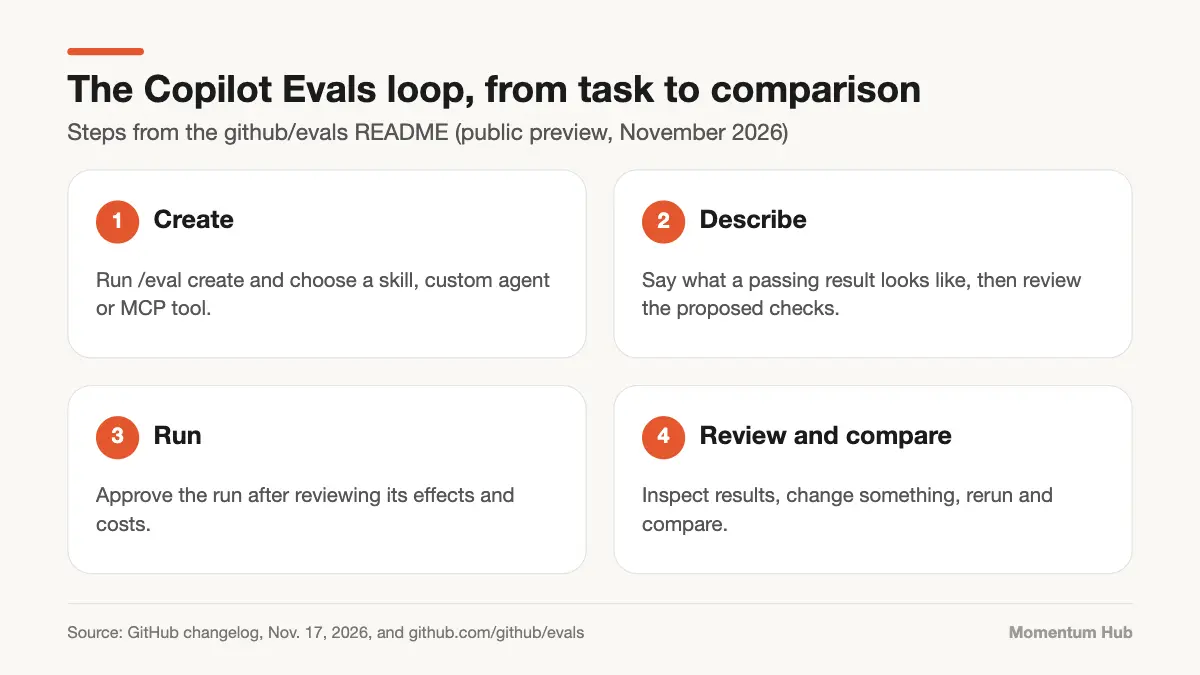
- Open a local project, trust the folder and sign in to Copilot.
- Run
/eval createand pick a skill, custom agent or MCP tool to test. - Describe what a passing result looks like, in plain language.
- Review the proposed test cases, fixtures and checks, then save.
- Run
/eval run, review the disclosed effects and costs, and approve. - Inspect results with
/eval review, change something, run again and use/eval compare.
The README’s example for a release-notes skill shows what a good description looks like: specific inputs, one completed issue and one open issue, and checks you could verify yourself, such as keeping only completed work, preserving issue IDs and leaving the input files unchanged.
If skills, custom agents and instructions still blur together for you, Kayla Cinnamon’s explainer separates them clearly:
What to Watch Out For
- Costs and side effects. Setup scripts, tools and graders can execute code and incur charges, the README warns. That’s why each run asks first.
- A pass isn’t a promise. GitHub notes that a passing check doesn’t guarantee the AI gets it right every time.
- Results stay in your project. Saved results go to
.copilot/evals/results. Review them before you share them. - Telemetry is on by default. Turn it off with
COPILOT_EVALS_TELEMETRY=off,DO_NOT_TRACK=1orOTEL_SDK_DISABLED=true. - Source available, not open source. The plugin uses the GitHub Limited Use Source License, which allows internal use but not offering it as a product.
Why Copilot Evals Matters for Agent Teams
Agent setups now change weekly. Agent skills are gaining quality gates, MCP servers can ship skills of their own, and agent teams like Replit Missions use an AI judge to check work. Copilot Evals brings that kind of checking to your own customizations, so a prompt tweak becomes something you can measure instead of something you hope about.
It also arrived as part of a wider governance push. On the same day, GitHub announced that enterprises can stream Copilot agent activity into Microsoft Agent 365, and that secret scanning can run on demand for developers and agents.
GitHub’s own tutorial on agents, skills and instructions in the Copilot CLI is a good next step. This is the maker’s video:
Quick Questions, Answered
Who can use Copilot Evals? Copilot Individual, Business and Enterprise users, in VS Code, the Copilot CLI and the Copilot app.
Can it test prompts or model choices directly? GitHub lists skills, custom agents and MCP tools as the things you test. Prompts and models matter as changes you compare between runs.
Does a passing eval mean my agent is safe? No. It means the agent passed those checks on that run. Rerun the eval after every change that matters.
Final Thoughts: Make Copilot Evals Part of Every Change
The hardest part of working with agents is knowing whether a change helped. Copilot Evals won’t make that certain, but it makes it repeatable. Start with one skill you rely on, write two or three checks you’d verify by hand, and run them before and after your next edit.