- 1. AI Assistants Inside the Apps
- 2. Firefly Design: One Canvas for Everything
- 3. Firefly Graph: Repeatable AI Workflows
- 4. Firefly Builder Moves Toward Figma
- 5. A Local MCP Opens Adobe to Outside Assistants
- 6. Smaller Tools You Can Use Today
- 7. Always-On Agents Are a Preview, Not a Product
- What Designers Should Do Now
- Quick Questions, Answered
- Final Thoughts: More Hands, Same Eye
Adobe MAX is the design industry’s biggest annual show, and this year’s keynote, held on November 10, 2026 in Miami Beach, had one clear theme: the assistant. Adobe put AI helpers inside its main creative apps, introduced three new Firefly tools, and opened its software to outside chatbots. It also stepped directly onto Figma’s ground.
The difficulty with any keynote is separating what you can use today from what was only shown on stage. This guide sorts seven announcements by what they are and how ready they are, so designers can decide what deserves attention now.
Key takeaways
- AI assistants, branded Creative Agent, are in beta across Creative Cloud apps.
- Firefly Design and Firefly Graph are in public beta. Firefly Builder, a prototyping tool, is in private beta.
- A local MCP lets outside AI assistants work inside Photoshop, Illustrator, Premiere, and After Effects. It is a preview.
- Most headline features are betas or previews. Only a few editing tools are generally available.
3 new Firefly tools
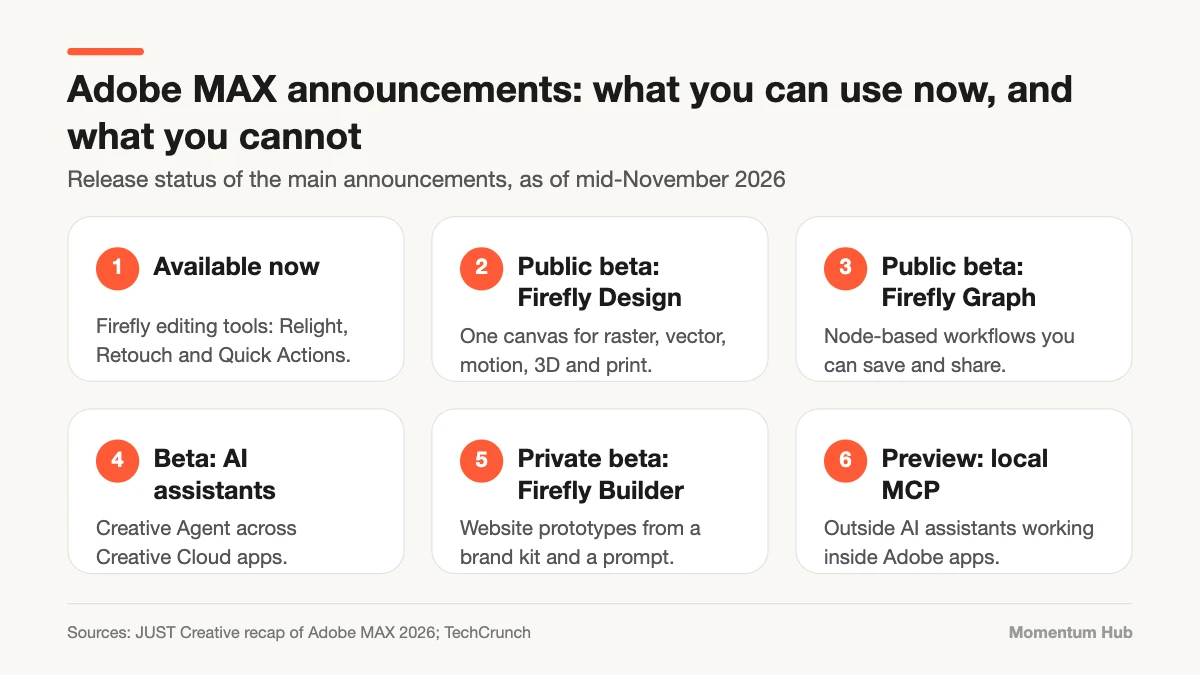
Firefly Design and Firefly Graph are in public beta, and Firefly Builder is in private beta, according to a recap by JUST Creative.
1. AI Assistants Inside the Apps
The central announcement at Adobe MAX was Creative Agent: AI assistants that work inside Creative Cloud apps and Firefly. Instead of hunting through menus, you describe what you want, and the assistant carries out steps in the app.
Demonstrations included an Illustrator assistant that prepares files for production, a Premiere assistant that works with transcripts and markers, and an After Effects assistant that builds editable layers and keyframes. These are in beta, and the Photoshop assistant lives in the separate Photoshop beta app.
2. Firefly Design: One Canvas for Everything
Firefly Design is a new workspace that combines raster images, vectors, motion, 3D, and print design on a single canvas. It is in public beta, so anyone with access can try it.
The idea answers a real frustration. Most projects today move between four or five apps. A single canvas reduces the exporting and re-importing that eats so much of a designer’s day.
3. Firefly Graph: Repeatable AI Workflows
Firefly Graph, also in public beta, lets you chain steps together as nodes, for example generate an image, remove the background, apply a style, and resize for five formats. Workflows can be packaged and shared.
This matters for teams. A good result from an AI tool is often hard to repeat. A saved workflow turns a lucky outcome into a process.
4. Firefly Builder Moves Toward Figma
Firefly Builder generates responsive website prototypes from a brand kit and a written prompt. It is in private beta. TechCrunch describes it as a prototyping tool that targets Figma’s market.
That is a notable shift three years after Adobe abandoned its attempt to buy Figma under regulatory pressure. Competition here is good for designers, though a private beta is a statement of intent, not a product you can plan around yet.
5. A Local MCP Opens Adobe to Outside Assistants
Adobe also previewed local MCP integrations for Photoshop, Illustrator, Premiere, and After Effects. MCP, the Model Context Protocol, is a standard that lets AI assistants such as ChatGPT, Claude, or Gemini use an app’s features.
It is early. The recap lists a private beta for early 2027, and Adobe says it is still deciding which features to expose. Not everyone is enthusiastic: TechCrunch notes that Figma co-founder Dylan Field said in October that MCP is an imperfect standard that mostly benefits the large AI labs. We explained how the protocol works in our guide to MCP file transfers.
6. Smaller Tools You Can Use Today
Away from the headline betas, a few features are generally available. Firefly’s editing tools, Relight, Retouch, and Quick Actions, are out now, and Relight is also available in Photoshop. Illustrator gained features including Dynamic Text and Concept to Vector, and InDesign’s co-editing is in beta.
Adobe also showed image restoration and upscaling models from Topaz Labs, which it has acquired. Access and pricing for those are separate from a standard Creative Cloud plan.
7. Always-On Agents Are a Preview, Not a Product
Adobe previewed creative agents that keep working in the background. This is the most ambitious idea of the show and the furthest from release. Treat it as a direction of travel.
What Designers Should Do Now
- Separate shipped features from betas when you plan real projects. Do not promise a client a workflow that depends on a preview.
- Try Firefly Design and Graph on a personal project to learn what they are good at.
- Write down your brand rules in plain language. Assistants follow clear instructions far better than unwritten taste.
- Test any assistant on duplicate files, never on your only copy.
- Check licensing and usage terms for generated assets before using them commercially.
- Keep your core craft sharp. Tools that execute faster make judgment more valuable, not less.
We looked at the bigger shift in AI and automation in design and at practical uses in AI in marketing design.
Quick Questions, Answered
Do I need to learn all of this now? No. Learn the features that are generally available or in public beta, and watch the rest.
Will AI assistants replace designers? They automate steps, not judgment. Someone still has to decide what good looks like and why.
Is my current Creative Cloud plan enough? Not every capability is included in every subscription, so check what your plan covers before relying on a feature.
Final Thoughts: More Hands, Same Eye
Adobe MAX made one thing clear: the creative apps of the next few years will come with assistants built in. That gives every designer more hands. It does not give anyone a better eye. Use the betas to learn, keep client work on stable tools, and invest in the judgment the software cannot supply. For more, visit our Design section.