- What CSS random() Does
- 1. Tilted Cards and Photos
- 2. Organic Typography
- 3. Scattered Decoration
- 4. Staggered Animation Timing
- 5. Subtle Color Variation
- Fallbacks: Design for Browsers Without It
- Accessibility and Good Judgment
- Where Not to Use It
- Quick Questions, Answered
- Final Thoughts: A Little Mess, On Purpose
CSS random() gives stylesheets something they have never had: a built-in way to produce a random value. For years, any design that needed a little variation, such as slightly tilted cards or scattered decorations, required JavaScript or a build tool. Now a single line of CSS can do it, and browser support has just reached the point where it is worth learning.
According to Google’s monthly web platform roundup, the function shipped in Chrome 156 and Edge 156, and it is also in Safari 26.2. This guide explains how it works, shows five good uses, and covers the fallbacks and accessibility checks you need.
Key takeaways
- CSS random() returns a value between a minimum and a maximum, with an optional step.
- It now works in Chrome, Edge, and Safari. Firefox support is still in testing, so fallbacks are required.
- Small ranges create a hand-made feel. Large ranges create chaos.
- Never randomize anything that affects reading order, meaning, or motion sensitivity.
3 browsers
CSS random() is supported in Chrome 156, Edge 156, and Safari 26.2, with Firefox still in testing, according to web.dev.
What CSS random() Does
The function is part of the CSS Values and Units Level 5 specification. You give it a lowest and highest value, and the browser picks something in between when the page loads. An optional third value sets a step, so results land on tidy intervals.
.card {
rotate: random(-3deg, 3deg);
margin-block-start: random(0px, 24px, 8px);
}
In this example each card tilts slightly, by up to three degrees either way, and gets a top margin of 0, 8, 16, or 24 pixels. Because the step keeps margins on an 8-pixel rhythm, the layout still feels orderly.
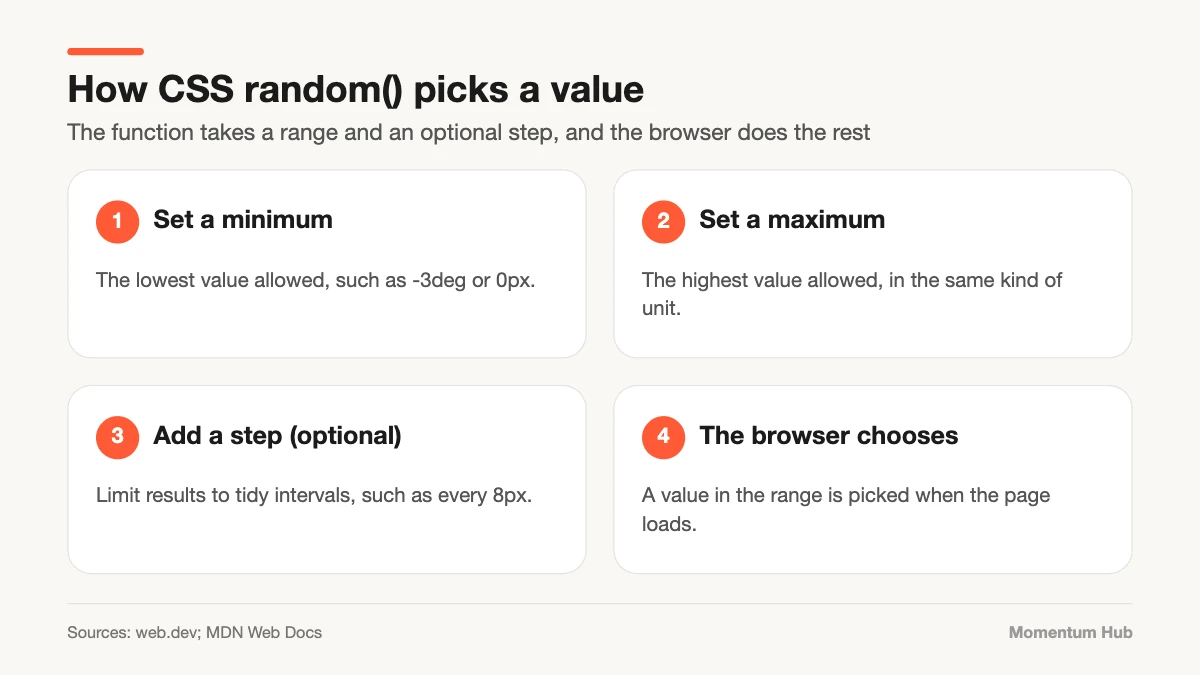
By default, each use of the function produces its own value. An optional key lets you share one random value across several properties or elements, which is useful when width and height should match. The details of this sharing behavior changed while the feature was being developed, so check MDN’s reference for the current syntax before relying on it.
1. Tilted Cards and Photos
A grid of perfectly aligned images can feel sterile. A tilt of one to three degrees makes a gallery look like photos laid on a table. This is the most popular demo for good reason: it is subtle, quick, and hard to get wrong.
2. Organic Typography
In a recent Smashing Magazine article, Brecht De Ruyte explores letters that shift and rotate slightly, giving headlines a hand-set or cut-out look. Used on a large display heading, it adds character. Used on body text, it would be unreadable, so keep it to short, decorative type.
3. Scattered Decoration
Background shapes, stars, confetti, or texture marks look more natural when their position and size vary. Before, designers either placed each one by hand or wrote a script. Now a few declarations can scatter a field of elements differently for every visitor.
4. Staggered Animation Timing
When several items animate at exactly the same moment, the result feels mechanical. Giving each one a slightly different delay or duration creates a looser, more natural rhythm. Keep the range short, a fraction of a second, so the page still feels responsive.
5. Subtle Color Variation
A small shift in lightness or hue from one card to the next can make a repeated pattern feel less stamped out. Stay within your palette, and check contrast at both ends of the range so text never becomes hard to read.
Fallbacks: Design for Browsers Without It
The feature is not yet available everywhere, so write the plain version first and add randomness as an enhancement.
.card {
rotate: 1deg;
}

@supports (rotate: random(0deg, 1deg)) {
.card {
  rotate: random(-3deg, 3deg);
}
}
Browsers that do not understand the function simply use the first rule. Nothing breaks, and the design still looks intentional.
Accessibility and Good Judgment
Randomness is decoration. It must never get in the way of understanding.
- Do not randomize the order of content. Screen readers and keyboard users rely on a predictable sequence.
- Keep text straight and stable. Tilt containers and images, not paragraphs.
- Respect the reduced-motion setting, and switch off random animation for people who ask for less movement.
- Test the extremes. If the largest tilt or smallest margin looks broken, narrow the range.
- Remember the value changes on reload. If a layout must be identical every time, this is the wrong tool.
- Use steps to stay on your spacing scale.
Where Not to Use It
Avoid it in forms, navigation, data tables, and anything a user needs to find again in the same place. Avoid it for values that carry meaning, such as chart sizes. And avoid large ranges in general. The goal is the warmth of something made by hand, not the confusion of something broken. The psychology behind that warmth is covered in our piece on design psychology.
Quick Questions, Answered
Does CSS random() replace JavaScript? For visual variation, often yes. For logic, games, or anything that must be tracked or repeated, you still need JavaScript.
Is the value the same for every visitor? No. The browser picks a value when the page loads, so it can differ between visits.
Is it safe to use in production? Yes, as an enhancement with a sensible fallback. Do not make a layout depend on it.
Final Thoughts: A Little Mess, On Purpose
CSS random() is a small feature with a clear design message. After years of pixel-perfect grids, the web is making room for controlled imperfection. Use a light touch, keep content readable, and let the browser add the variation a human hand would. If you enjoy this kind of detail, our explainer on squircles and smooth corners is a good next read, and there is more in our Design section.