Design handoff has always come with a stream of questions. Which variable is this? What changed since last week? How should this layout work in CSS? On Nov. 19, Figma brought its AI agent into Dev Mode, the part of Figma built for developers, so you can ask those questions where the design lives. Four days later, the Figma agent became generally available in FigJam and Figma Slides on all paid plans.
If you followed our coverage of Adobe’s new AI assistants, this is Figma pushing further into the developer side of the workflow. Here is what the Figma agent can do in Dev Mode, who can use it, and what it still cannot do.
Key takeaways
- In Dev Mode, the Figma agent can explain designs, compare versions, write code snippets and prepare asset download links.
- Dev seats can chat with it without changing designs. Dev Mode is not available on Starter plans or with View or Collab seats.
- The Figma agent does not export assets for you. It gives you links to download them yourself.
- It now works in FigJam and Slides too, with connectors to tools like Hex, Slack and Asana.
All paid plans
The Figma agent is now generally available in FigJam and Figma Slides on every paid plan, with connectors and attachments, according to Figma’s release notes.
What the Figma Agent Can Do in Dev Mode
According to Figma’s help center, the Figma agent in Dev Mode covers four jobs.
Understand a design
Ask how a component is supposed to behave, or which layers could use existing variables instead of hard-coded values. That second question is a quick way to catch design system drift before it reaches code.
Get implementation guidance
Ask how to build a layout with CSS grid or flexbox, or request a React code snippet. Treat the code as a starting point: it reflects the design, not your codebase’s conventions.
Compare versions
Ask what changed between versions of a component or design, and get a visual diff or a list of changes in the chat. For developers picking up an updated file, this may be the most useful feature.
Prepare assets
Ask for links to save icon components as SVGs, or have it generate CSS for variables. The agent will not export assets on your behalf, but it gives you links to download them yourself. This Figma video shares tips for getting better results from the agent.
Who Can Use the Figma Agent in Dev Mode
Your seat and plan decide what you can do:
- Dev seats can chat with the agent in Dev Mode without changing the design.
- Full seats can also ask the agent to make edits.
- Dev Mode is not available on Starter plans or with View or Collab seats.
The agent uses AI credits, and the number of credits depends on how complex the task is. To open it, select a layer and press Cmd or Ctrl + Enter, or open the Agents panel.
A Busy Week of Agent Updates
The Dev Mode launch was part of a run of releases.
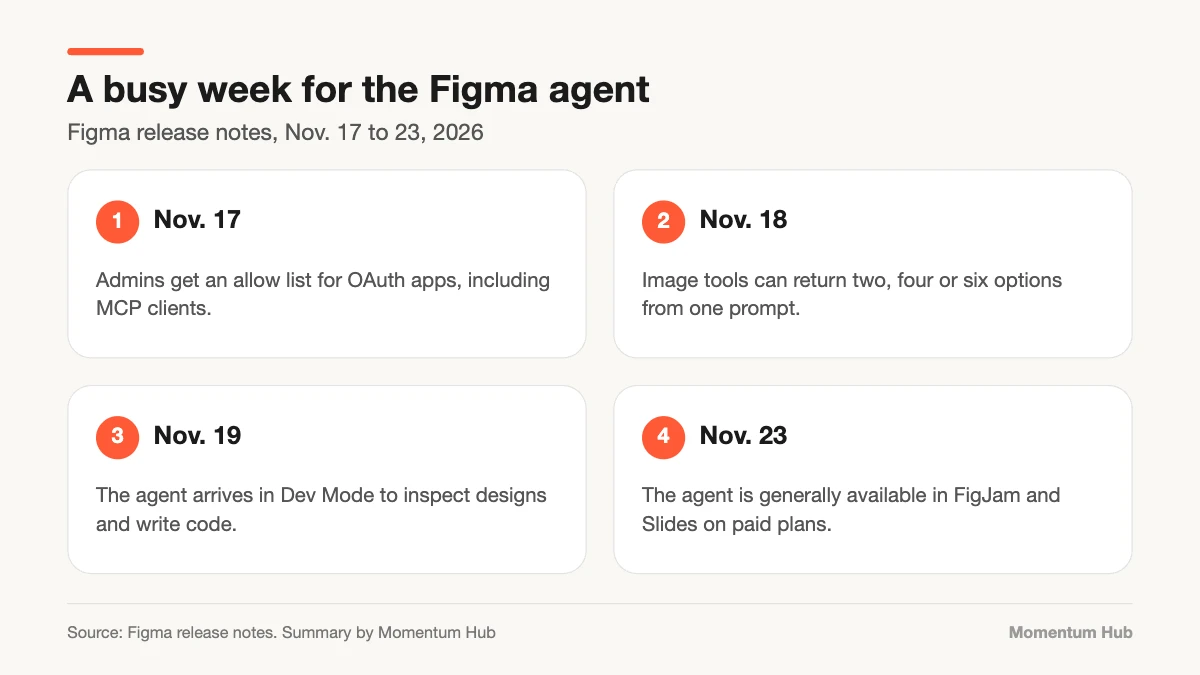
The Nov. 17 update matters for teams that use coding agents. Admins on Organization and Enterprise plans can keep an allow list of approved OAuth apps, including MCP clients like Cursor and Claude Code, so companies decide which outside agents can connect. Our explainer on MCP covers how those connections work.
In FigJam and Slides, the agent can now pull in context from tools like Hex, Slack and Asana, turn a messy board into an organized Spec with next steps, and build a deck from a Spec outline and a brand template, speaker notes included. This Figma video introduces agents across Figma Design, FigJam and Slides.
How to Use the Figma Agent Well in Handoff
- Start with a question about one component, not a whole page.
- Ask the agent to compare versions before you start building from an updated file.
- Ask which layers should use variables, and fix those in the design before you code.
- Put generated code on a branch and review it like any pull request.
- Agree as a team on when developers ask the agent and when they ask the designer.
The Bigger Picture: Design Tools Become Agent Platforms
Figma is becoming a place where agents work alongside people, not just a canvas. The agent in Dev Mode, the MCP allow list and connectors in FigJam all point the same way: design files are turning into context for AI tools, inside Figma and out. That raises the value of tidy files. Clear names, consistent variables and documented components help an agent as much as a new teammate, and Agent Skills let teams package their conventions for agents to follow. Small details matter too, like the smooth corners many design systems now use.
Quick Questions, Answered
Is the Figma agent free? You can try the agent in Figma Design on the free Starter plan, but Dev Mode needs a paid plan, and agent use draws on AI credits.
Can the agent change my design from Dev Mode? Only with a Full seat. Dev seats can chat but not edit.
Can it write production code? It writes CSS and React snippets. Review them like any other code before you ship.
Final Thoughts: Fewer Questions Lost in Handoff
The Figma agent in Dev Mode will not replace conversations between designers and developers, and it should not. What it can do is answer the small, constant questions that slow handoff down, right where the design lives. Try it on your next update: ask what changed, which layers need variables, and how the layout should work in code. Then check the answers.