
AI agents are good at reading and writing text. They are much worse at clicking through a desktop app that was built for people. CLI-Anything, an open-source project from the Data Intelligence Lab at HKU, takes a different route: instead of teaching an agent to use the mouse, it gives the app a command line. On Nov. 25 it ranked third on GitHub’s daily trending list, with more than 65,000 stars.
If you have read about agent-browser, the idea will feel familiar. Here is what CLI-Anything does, how its pipeline works, and how to try it without giving an agent more power than you meant to.
Key takeaways
- CLI-Anything generates command-line tools, which it calls harnesses, for desktop software such as GIMP, Blender and LibreOffice.
- Each harness calls the real app underneath and returns JSON, so agents get structured results instead of screenshots.
- A package manager called CLI-Hub lets you search for and install ready-made harnesses with one command.
- It is young, fast-moving software. Treat every harness as code you are choosing to run.
65,000+
GitHub stars on CLI-Anything as of Nov. 25, 2026, when it ranked third on GitHub’s daily trending list. Stars measure interest, not quality.
What CLI-Anything Actually Does
Most software was built for people, so its features live behind menus, dialogs and canvases. An agent can try to operate that interface through screenshots, but every click is a guess. CLI-Anything bets that a command line is a better interface for agents: clear commands, predictable output and errors that come back as text.
The project calls each generated tool a harness. A harness wraps the real program, so GIMP still edits the image and LibreOffice still renders the document. The command-line layer adds JSON output, an interactive REPL, saved project state, and undo and redo. Its June release, v0.4.0, added about 30 new harnesses, including ArcGIS Pro, Calibre and Unreal Editor.
According to the README, it works with Claude Code, Cursor, OpenClaw and Goose, with Codex and several others marked experimental. AICodeKing’s video shows the GIMP and Blender demos in action.
How the CLI-Anything Pipeline Works
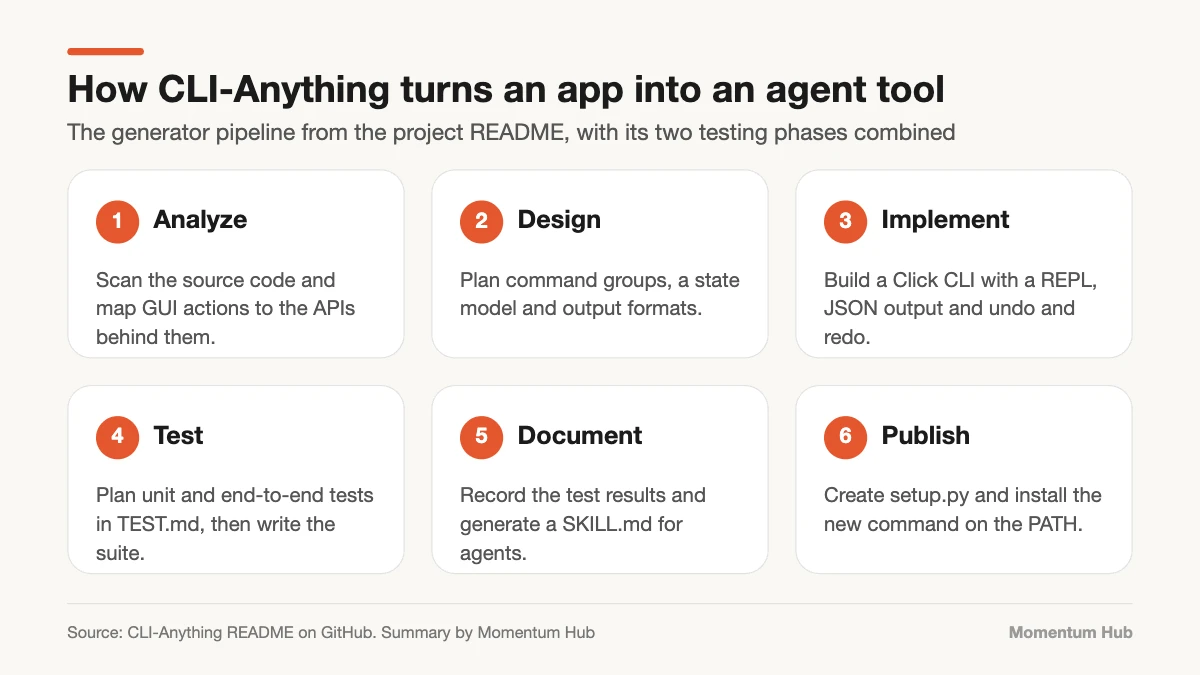
When no harness exists for an app yet, you can generate one. The README describes a seven-phase pipeline that starts with the app’s source code and ends with an installed command.
Analyze and design
First, the generator scans the source and maps actions you would take in the interface to the functions behind them. Then it plans the command groups, how state is stored between steps, and which output formats to support.
Build, test and publish
Next, it writes the tool itself, plans unit and end-to-end tests in a TEST.md file, writes the test suite, records the results and packages the command. Each harness also gets a SKILL.md file that tells agents how to use it. If skills are new to you, our guide to Agent Skills explains the format.
The README cites more than 2,280 tests across 18 major applications. That is the maintainers’ own count, and a large test number is not the same as independent review.
How to Try It
You need Python 3.10 or newer, plus Git for Windows or WSL if you are on Windows. If a harness wraps a desktop app, install that app separately. The quickest start is CLI-Hub, the project’s package manager:
pip install cli-anything-hub
cli-hub search image
cli-hub info gimp
cli-hub install gimp
To generate a new harness in Claude Code, add the plugin from inside a session:
/plugin marketplace add HKUDS/CLI-Anything
/plugin install cli-anything
/cli-anything ./gimp
There is also a meta-skill that lets skill-compatible agents find and install harnesses themselves: npx skills add HKUDS/CLI-Anything --skill cli-hub-meta-skill -g -y. Alex Hitt’s walkthrough covers the repository and a first install.
Use It Safely
A harness is code that controls software on your machine, and an agent that can run it can change real files. The maintainers have fixed real security issues along the way, including a GIMP script injection bug and a path traversal bug, and v0.4.0 added several hardening changes. That is a good sign of active maintenance. It is also a reminder to stay careful.
- Install only the harnesses you need, and read their SKILL.md before an agent uses them.
- Work on copies of important files, or in a folder you can restore.
- Prefer harnesses from the project’s own registry over unknown forks.
- Add checks the agent must pass before you accept its output. Our post on AI agent verification has a starter checklist.
The Bigger Picture: Command Lines as Agent Interfaces
CLI-Anything is part of a wider shift. Instead of making agents better at human interfaces, developers are giving software interfaces that agents handle well. MCP servers do this for apps and data, and command-line tools do it for local software. Our explainer on MCP’s latest changes covers the protocol side. A command line has one big advantage: it is easy to inspect, script and log, which matters when you need to know exactly what an agent did.
Quick Questions, Answered
Is CLI-Anything free? Yes. It is open source under the Apache 2.0 license. The desktop apps it controls keep their own licenses.
Do I need to be a developer? Some comfort with a terminal helps. Installing a ready-made harness takes a few commands. Generating a new one is more involved.
Does it replace GUI agents? Not entirely. It works best when an app has a scriptable backend. For apps without one, screen-based agents are still the fallback.
Final Thoughts: A Practical Bridge for Agents
CLI-Anything will not make every app agent-ready overnight, and its star count says more about excitement than reliability. But the core idea is sound: give agents clear commands and structured output, and keep a real program doing the real work. Try one harness on a copy of your files, read what it does, and decide from there.