
- Why AI Search Traffic Is Hard to See
- Step 1: Read Google's New Referrer Documentation
- Step 2: Create an AI Channel Group in GA4
- Step 3: Check Landing Pages, Not Only Totals
- Step 4: Handle Google's AI Features Separately
- Step 5: Tag What You Control
- Step 6: Set Your Comparison Windows Now
- What to Do With the Data
- Caveats on the Numbers
- The Bigger Picture: Search Is Splitting Into Many Doors
- Quick Questions, Answered
- Final Thoughts: See It Before You Chase It
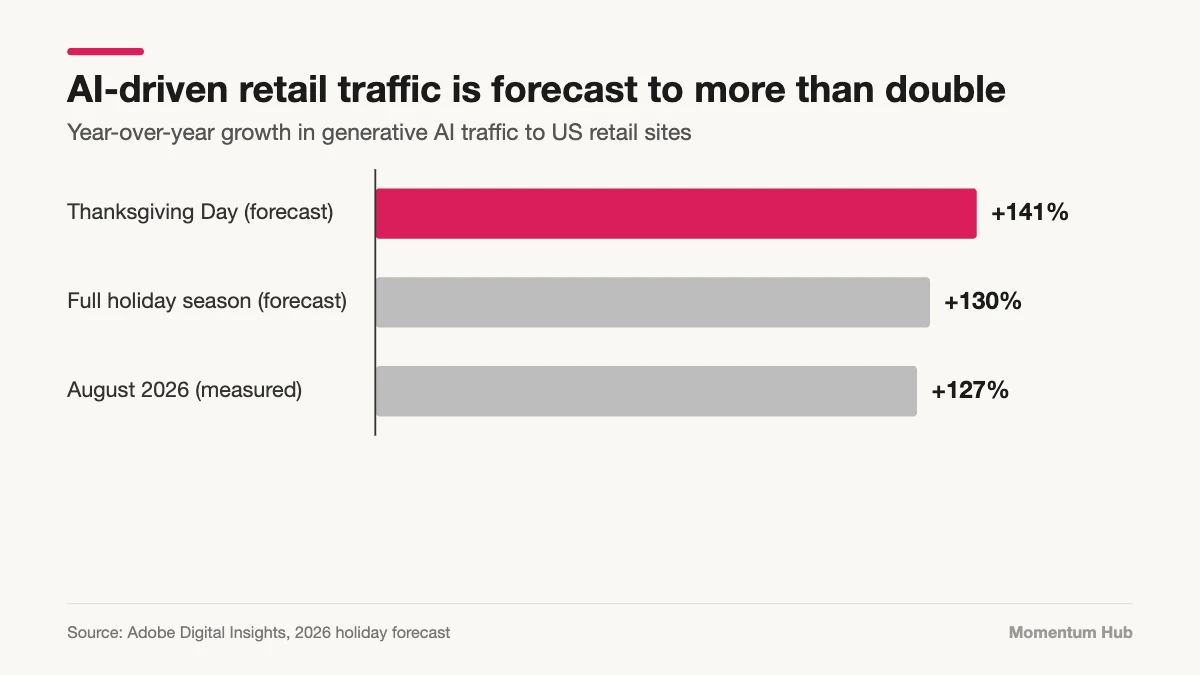
AI search traffic is about to have its biggest season yet. Adobe’s holiday forecast expects visits to US retail sites from generative AI tools to rise 130% over last year, and 141% on Thanksgiving Day. Most analytics setups will file those visits under a vague label, or miss them.
There is a second reason to act now. On November 12, 2026, Google Search Central added documentation on identifying traffic from Google Search using HTTP referrer headers. Clean attribution is on Google’s mind too. With Black Friday on November 27, here is a six-step setup you can finish in an afternoon. It builds on the basics in our SEO strategies guide.
Key takeaways
- Adobe forecasts a 130% year-over-year rise in AI-driven traffic to US retail sites this season.
- By default, Google Analytics 4 puts most AI assistant visits in the Referral channel, where they are easy to overlook.
- A custom channel group with one regular expression separates them in minutes.
- Visits from Google’s own AI features arrive as Google organic traffic, so they need a different check.
+130%
Forecast year-over-year growth in generative AI traffic to US retail sites for the 2026 holiday season, from Adobe Digital Insights.
Why AI Search Traffic Is Hard to See
When someone clicks a link inside ChatGPT, Perplexity, or a similar assistant, your site receives a referrer like chatgpt.com. Analytics tools treat that as an ordinary referring website. It lands in the same bucket as blogs and directories.
Some visits arrive with no referrer at all, especially from mobile apps. Those show up as Direct. So the number you can see is a floor, not the full picture.
Step 1: Read Google’s New Referrer Documentation
Start with the source. The new Search Central page explains how site owners can identify and track traffic from Google Search in their analytics using HTTP referrer headers. Check that your setup classifies Google Search visits the way the page describes before you layer anything on top.
Step 2: Create an AI Channel Group in GA4
In Google Analytics 4, open Admin, then Data display, then Channel groups. Copy the default group and add a new channel called AI Assistants. Set the condition to Source matches regex, and paste a pattern like this:
chatgpt\.com|chat\.openai\.com|perplexity\.ai|gemini\.google\.com|copilot\.microsoft\.com|claude\.aiDrag the new channel above Referral in the list. GA4 applies channel rules from top to bottom, so order matters.
Step 3: Check Landing Pages, Not Only Totals
A total tells you AI search traffic exists. Landing pages tell you why. Build a report of landing page by your new channel. You will usually find that assistants send people to specific guides, comparison pages, and product details, not to your home page.
Those pages are your AI shop window. Make sure prices, stock status, and delivery dates on them are current before the sales begin.
Step 4: Handle Google’s AI Features Separately
Clicks from Google’s AI Overviews and AI Mode come from Google itself, so GA4 counts them as Google organic search. A referrer rule cannot split them out.
Use Search Console for that side. Its reports on generative AI features show how your pages appear there. Compare them with your organic landing pages to see where AI answers are driving visits.
Step 5: Tag What You Control
Anywhere you place your own links, add campaign tags. That includes product feeds, partner listings, and any data you submit to shopping assistants. Tagged links survive even when the referrer is stripped.
Keep the naming simple and consistent, for example a source of the assistant’s name and a medium of ai.
Step 6: Set Your Comparison Windows Now
Decide today what you will compare after the holiday. A useful set is Thanksgiving through Cyber Monday against the same days last year, plus the two weeks before. Add annotations for the dates of Google’s November core update, so you do not mistake a ranking change for a seasonal one.
What to Do With the Data
- If AI search traffic converts well, make the top landing pages richer: clear specifications, honest comparisons, and plain answers to common questions.
- If it bounces, check whether the page matches what the assistant promised.
- Share the top ten AI landing pages with your merchandising team before Black Friday.
- Watch share, not only volume. A small channel growing fast deserves attention early.
Shoppers are also wary this year. Our piece on Black Friday discounts and brand trust explains why accurate information matters more than a louder offer.
Caveats on the Numbers
- Adobe’s season figure is a forecast. Its measured figure for August 2026 was a 127% rise, which gives the forecast some grounding.
- Adobe’s data covers US retail sites. Your category may differ.
- Growth from a small base looks dramatic. AI visits are still a minority of traffic for most sites.
- Assistants change how they pass referrers. Recheck your pattern every quarter.
The Bigger Picture: Search Is Splitting Into Many Doors
For twenty years, search marketing meant one front door. Now people arrive through assistants, AI summaries, social search, and alternative search engines. We looked at the reader’s side of that shift in AI as the new gateway to information.
You cannot optimize for a door you cannot see. Measurement comes first, and it is cheap. Channel groups work the same way for social visits, which we covered in social media marketing.
Quick Questions, Answered
Does GA4 track AI search traffic by default? It records the visits, mostly under Referral or Direct. A custom channel group makes them visible.
Can I separate Google AI Mode visits in GA4? Not by referrer. They count as Google organic. Use Search Console alongside GA4.
How long does setup take? About thirty minutes for the channel group and a landing page report.
Final Thoughts: See It Before You Chase It
AI search traffic may be small on your site today, and it is growing faster than any other source. Set up the channel, check the landing pages, and fix your comparison dates this week. When the holiday numbers arrive, you will know what the assistants sent you.