
Googlebook is Google’s new name for a new kind of laptop. After fifteen years of Chromebooks, the company has built a premium laptop line that runs an Android-based operating system and puts its Gemini AI at the center. The first models went on sale in October 2026, and with the holiday shopping season here, many people are asking the same question: is this the laptop to buy?
There was little new gadget news this week, so this is a good moment for a clear explainer. Here are six things to know, drawn from Google’s own announcement and independent coverage, plus an honest buying checklist.
Key takeaways
- A Googlebook is a premium laptop running Google’s Android-based system, positioned above Chromebooks.
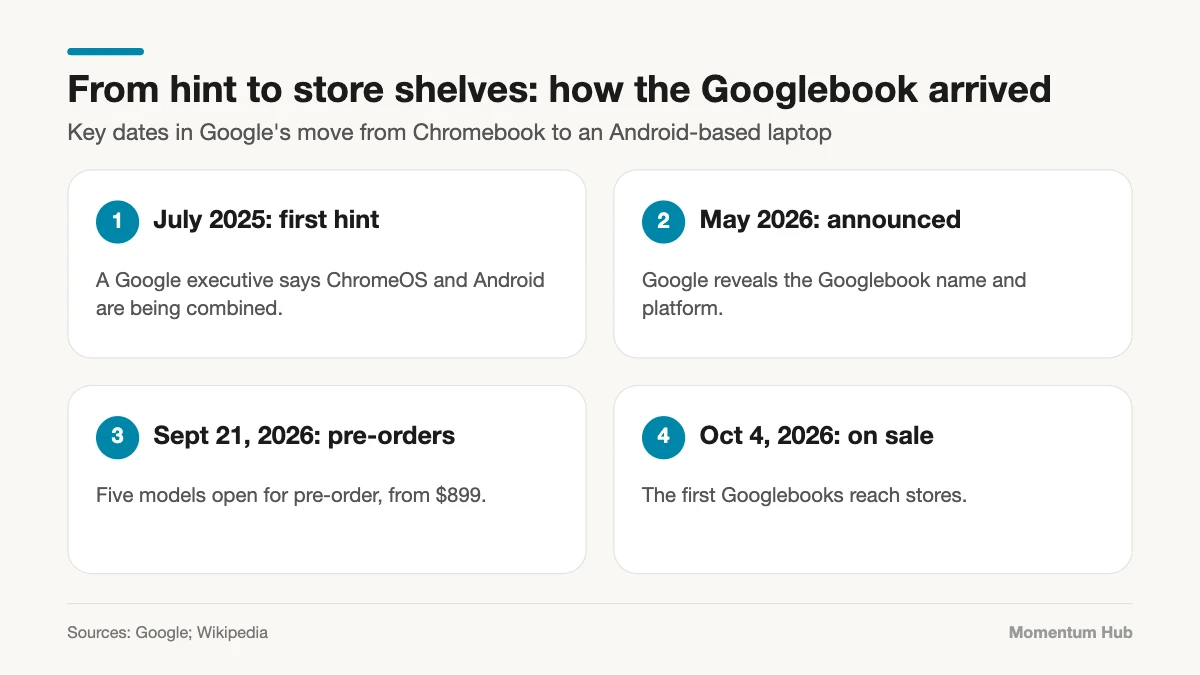
- Five models launched from Acer, Asus, Dell, HP, and Lenovo, starting at $899.
- Gemini features such as Magic Pointer and voice dictation are built in, with a year of Google’s AI subscription included.
- Check app compatibility and early reviews before you buy. Both are mixed.
$899
Starting price for a Googlebook, with devices on shelves from October 4, 2026, according to Google.
1. What a Googlebook Actually Is
A Googlebook is a laptop built to Google’s specification by a partner manufacturer, in the way Chromebooks have always been. The difference is underneath. Where a Chromebook runs ChromeOS, a Googlebook runs a desktop system based on Android, the software that powers most of the world’s phones.
Google describes the line as premium laptops designed to sync closely with an Android phone. Wikipedia’s summary notes that Google first hinted at merging ChromeOS and Android in July 2025.
2. The Five Launch Models
Five laptops were available at launch, from five familiar makers:
- Acer Googlebook 14, the entry model at $899
- Asus Googlebook 14
- HP Googlebook 14
- Lenovo Googlebook 15
- Dell XPS Googlebook
According to Google’s product page, the range starts at 16 GB of memory and 256 GB of storage, uses Intel Core Ultra or Snapdragon X Elite processors, and promises up to 14 hours of battery life. Reports put most models other than the Acer above $1,200, so check current prices before comparing.
3. Gemini Is the Main Selling Point
Google calls this the first laptop designed for what it brands Gemini Intelligence. The headline features include Magic Pointer, a voice dictation tool called Rambler, and the ability to create custom widgets by describing them.
Every purchase includes a 12-month subscription to Google’s advanced AI tools and cloud storage. That is real value in year one, and a cost to remember in year two if you want to keep it.
4. Googlebook vs Chromebook
Chromebooks are not going away. Google has said they will continue to be supported, and it places Googlebooks at the premium end of the laptop market. A simple way to think about it:
- Chromebook: affordable, simple, browser-first. Still the sensible choice for schools and basic use.
- Googlebook: more powerful, more expensive, built around Android apps and on-device AI.
If your needs are email, documents, and video calls, a Chromebook or a mid-range Windows laptop will do the job for much less.
5. App Compatibility Needs a Check
Running Android apps on a laptop sounds like the best of both worlds, and often it is. But Wikipedia’s entry cites a report that Google warned some Android apps would not run well on Intel-based Googlebooks at launch.
That matters because three of the launch models use Intel processors. Before you buy, list the five apps you cannot live without and confirm that each works well on the exact model you are considering.
6. Early Reviews Are Mixed
It is fair to say the launch has not been smooth for everyone. Early video reviews range from curious to sharply critical, as the two in this post show. First-generation products on a new operating system usually have rough edges, and they usually improve with updates.
If you are not in a hurry, waiting a few months for software updates and price cuts is a reasonable strategy.
A Buying Checklist
- Decide what you need the laptop for, in one sentence. If it fits a Chromebook, save your money.
- Check that your essential apps run well on the specific model.
- Compare the price with a Windows or Mac laptop of similar memory and storage.
- Ask how many years of software updates the model will receive.
- Try the keyboard and screen in a store if you can.
- Decide now whether you would pay for the AI subscription after the free year.
- Read at least two independent reviews written after the latest software update.
Who Should Consider One
A Googlebook makes the most sense for people who already live in Google’s world: an Android phone, Google Workspace, and regular use of Gemini. For that group, the phone-to-laptop continuity is the appeal.
It makes less sense if you depend on specialist Windows or Mac software, or if you simply want the cheapest reliable laptop. For a sense of how quickly AI features are becoming part of ordinary work, see how people actually work with AI.
Quick Questions, Answered
Is a Googlebook just an expensive Chromebook? No. It runs a different, Android-based system and is aimed at a higher price bracket.
Do I need to pay for Gemini? A year of Google’s AI subscription is included. After that, the advanced tools require a paid plan.
Should I wait? If your current laptop works, waiting for updates and discounts is sensible. First versions rarely stay the best value for long.
Final Thoughts: Promising, With Homework
The Googlebook is a real shift in how Google thinks about laptops, and the idea of one system across phone and computer is appealing. It is also a first-generation product with a premium price. Do the homework on apps and reviews, and buy for what you need today, not what an update might bring. For more hardware and software coverage, visit our Tech section, including our look at the move from 5G to 6G.