
AI agents are great at writing code and clumsy at clicking buttons. Give one a web page and it often drowns in HTML. A fast-growing open-source project from Vercel Labs takes a different approach, and it has passed 45,000 stars on GitHub.
It is called agent-browser, described simply as a browser automation CLI for AI agents. Here is how it works, why the design is clever, and what to watch out for. It is a good example of the practical tools reshaping how we use applications.
Key takeaways
- agent-browser is an Apache-2.0 command-line tool, built in Rust, that lets AI agents drive a real browser.
- Instead of raw HTML, the agent gets a compact accessibility snapshot with short references like @e2.
- It includes safety features: domain allowlists, action policies, and confirmation prompts.
- It can also run as an MCP server, so MCP-capable clients can use it.
The Problem: Web Pages Are Too Noisy for Models
A modern web page can contain thousands of lines of markup. Feeding all of that to a language model is slow and costly, and the model can lose track of what matters. Screenshots help, but pixels are an imprecise way to say “click that button.”
The Idea: Snapshots and Refs
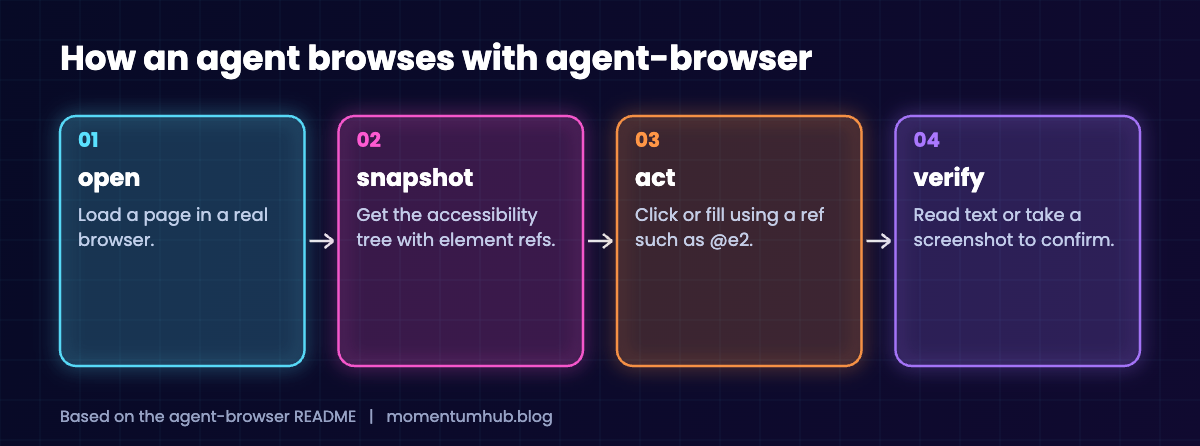
agent-browser gives the agent a small set of commands, such as open, snapshot, click, fill, and screenshot. The key one is snapshot. It returns the page’s accessibility tree, the same structure screen readers use, with a short reference attached to each element.
The agent then acts on those references. It can say “click @e2” instead of guessing coordinates or writing a fragile selector.
npm install -g agent-browser
agent-browser install

agent-browser open example.com
agent-browser snapshot
agent-browser click @e2
Why Accessibility Trees Are a Smart Choice
There is a nice lesson here. The accessibility tree exists so that people using assistive technology can navigate the web. It turns out that a clean, semantic description of a page is also what an AI agent needs. Sites built accessibly are easier for agents to use, one more reason to care about how people experience design.
The project even embeds accessibility audits, so the same tool can check a page for problems.
Guardrails Included
Letting software click around the web on your behalf should make you a little nervous. The project includes domain allowlists, action policies, and action confirmation. It also offers encrypted state files and an auth vault for sign-in data.
One limitation the README states plainly: state files store session tokens in plaintext unless encryption is turned on. So turn it on.
Where It Fits
The tool includes an MCP server with selectable tool profiles, which means clients that speak the Model Context Protocol can launch it. It also supports batch execution, saved sessions, and recording, which helps for testing websites as well as automating tasks.
Stated limits include features that do not work on the Safari path and a page-load wait that may never finish on sites with constant background connections.
Try It Safely
- Start on a test site or your own project, not your bank.
- Set a domain allowlist before giving an agent the tool.
- Enable encryption for saved state.
- Keep confirmations on for anything that submits forms or spends money.
- Review what the agent did. Recordings make that easy.
The Bigger Trend: Tools Built for Agents
agent-browser belongs to a growing category: software designed for AI agents first and people second. These tools favor compact text output, predictable commands, and built-in limits, because that is what a model needs to act reliably.
For developers, the takeaway is practical. If you want agents to use your product well, give them a clean, well-documented interface, not just a screen made for human eyes.
Quick Questions, Answered
Who makes agent-browser? It is an open-source project from Vercel Labs under the Apache-2.0 license.
Does it need a specific AI model? The README does not tie it to one. It is a command-line tool, and MCP clients can launch its server.
Is it safe to let an agent browse for me? It can be, with limits. Use allowlists, confirmations, and encrypted state, and stay away from sensitive accounts.
Final Thoughts: Give Agents Better Hands
Much of the progress in AI agents this year is not about smarter models. It is about better tools around them. agent-browser is a clear example: a small, well-designed interface that makes a hard task tractable.
As agents take on more decisions and actions, tools with guardrails built in are the ones worth adopting.