Look at an app icon on your phone. Its corners are not quite the rounded corners you get from a standard design tool. They are softer, and somehow more “finished.” That shape has a name: the squircle.
A detailed squircle guide from the Linebender project has been making the rounds among designers and developers. It is math-heavy, so here is the friendly version, with what it means for your next interface. It is a nice companion to our piece on design psychology.
Key takeaways
- A squircle is a shape between a square and a circle, and there is no single official definition.
- It looks smoother than a rounded rectangle because its curvature changes gradually.
- Apple adopted a squircle for iOS icons in 2013, and Figma offers “corner smoothing” to approximate it.
- CSS has a
corner-shapeproperty that can draw superellipse corners.
What a Squircle Actually Is
A squircle sits between a square and a circle. The best-known version is the superellipse, defined by a simple formula: |x|n + |y|n = 1. When n is 2 you get a circle. As n grows, the shape moves toward a square.
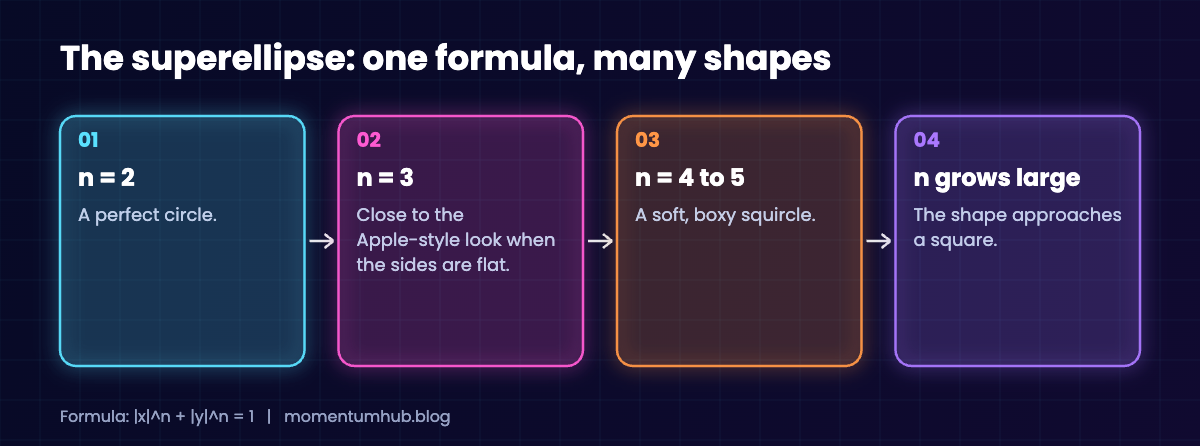
The guide stresses that there is no single definition. “Squircle” describes a family of curves, and different companies pick different ones.
Why It Looks Smoother Than a Rounded Rectangle
A normal rounded rectangle joins a straight line to a circular arc. The directions match at the join, but the curvature jumps abruptly from zero to a fixed value. Your eye notices that jump as a subtle “corner.”
Designers describe this with continuity levels. G1 means the tangents match. G2 means the curvature matches too, and that is what produces the feeling of smoothness. Squircles aim for G2.
How Apple and Figma Do It
Apple replaced the rounded rectangle with a squircle in iOS 7 in 2013. According to the guide, it is not a pure superellipse but a flat-sided shape with some small quirks.
Figma’s “corner smoothing” setting approximates the look using three Bézier segments per corner. The guide notes it is smooth where it meets the flat sides but still has a small curvature jump in the middle. For everyday interface work that is more than good enough, and it is one of the reasons Figma sits on our list of top design programs.
Squircles on the Web
For web designers, the exciting part is CSS. The corner-shape property accepts a superellipse() value. The guide suggests superellipse(1.585) with a border-radius of 46.2% on a square element for an Apple-like look.
.app-icon {
  width: 120px;
  height: 120px;
  border-radius: 46.2%;
  corner-shape: superellipse(1.585);
}
Browser support for newer CSS features varies, so test in the browsers your audience uses. Browsers that do not understand corner-shape will simply show the regular rounded corner.
Practical Tips for Your Next Design
- Use flat-sided squircles for rectangles of different proportions, so the corners do not distort.
- Aim for curvature continuity (G2) when smoothness is the goal.
- Remember that an outline offset from a squircle is not itself a squircle. Nested shapes may need their own corners.
- Use the effect with purpose. Icons, cards, and avatars benefit most.
When Not to Use a Squircle
Smooth corners are not always the answer. Dense data tables, form fields, and tiny buttons often read better with simple, modest rounding, where clarity matters more than personality. Overusing the effect can make an interface feel soft and unfocused.
A good rule: reserve squircles for the elements that carry your brand, and keep the functional pieces plain.
Quick Questions, Answered
Is a squircle just a rounded square? No. A rounded square uses circular arcs. A squircle changes curvature gradually, so the corner blends into the side.
Do I need math to use one? No. Figma’s corner smoothing and the CSS corner-shape property handle it for you.
Why does it matter? Small details shape how polished a product feels, even when users cannot say why.
Final Thoughts: The Corner Is the Craft
Nobody will compliment your corners. They will just feel that your product is well made. That is the quiet power of craft, and a theme running through the evolution of design trends.
Next time you draw a rectangle, zoom in on the corner. There is more going on there than you thought.